SEO for AI-Generated Websites: What to Fix Before Publishing Online
AI generated your website – but can Google actually see it? Complete technical pre-launch checklist: CSR vs SSR testing, meta tags, H1-H3 heading hierarchy, and Core Web Vitals.
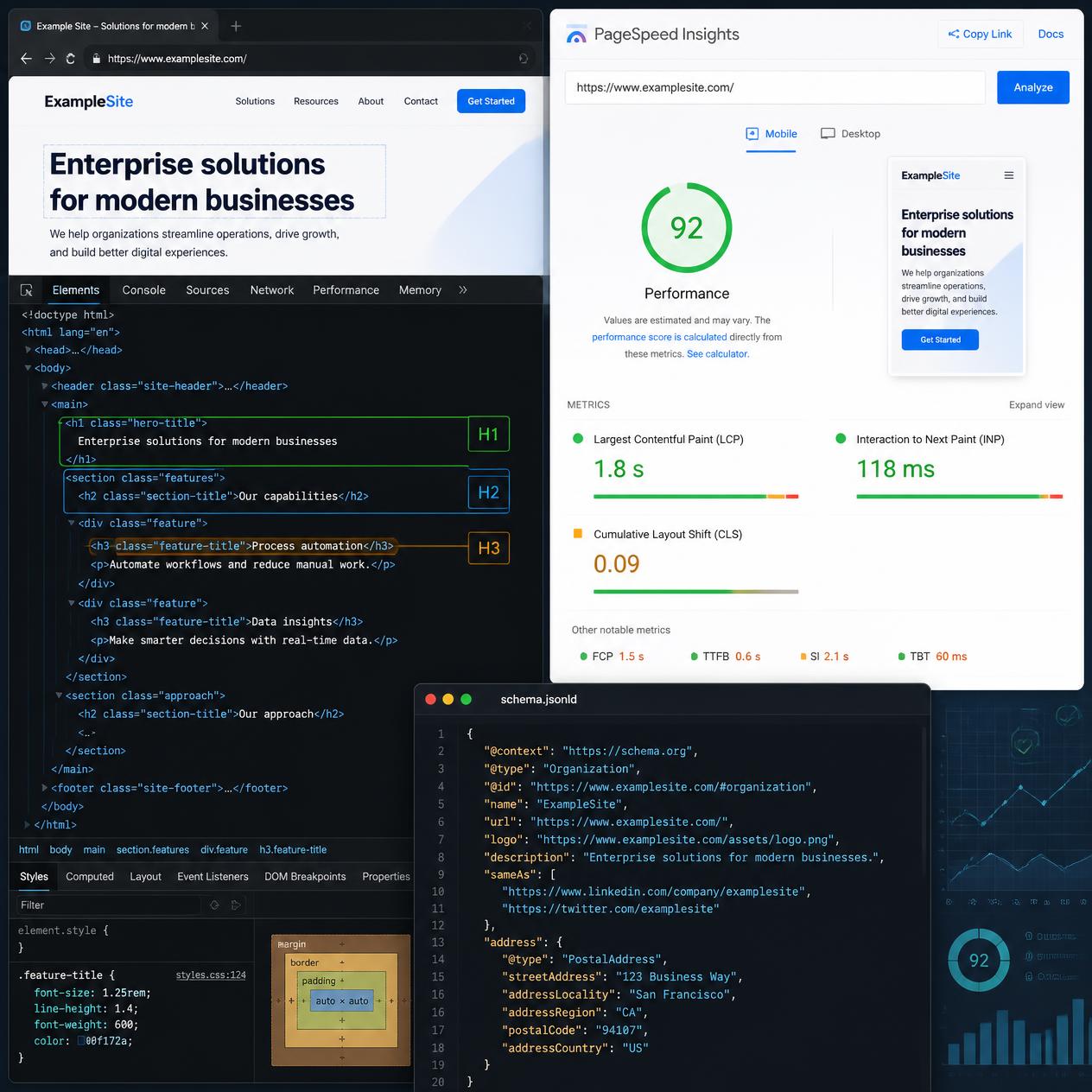
AI website generators are designed to deliver instantaneous visual gratification rather than cater to web search crawlers. In 2026, SEO for AI-generated websites demands a rigorous technical audit before publishing anything online. The single most pervasive defect in modern AI builders is Client-Side Rendering (CSR), which delivers an empty HTML skeleton to search engine crawlers with no readable text. According to Google Search Central documentation and Google PageSpeed Insights benchmarks, every commercial web property must fulfill five mandatory requirements: serve full static HTML on first byte (SSR/SSG), optimize meta Title (50–60 characters) and Description (150–160 characters), enforce a strict semantic heading hierarchy with a single H1 and logical H2–H3 subsections, implement clean JSON-LD structured data adhering to Schema.org specifications, and maintain Core Web Vitals scores above 90. Below is our comprehensive pre-deployment technical checklist designed to eliminate crawl and indexing traps before launch.
Why You Must Run the CSR vs. SSR Test Before Publishing
Before inspecting titles, keywords, or stylesheets, run the view-source test. Open your published page in any desktop browser, right-click, and select “View Page Source”. Use Ctrl+F (or Cmd+F) to search for your primary H1 heading or a distinctive sentence from your hero section.
If you cannot find your text in the raw page source, your website is effectively invisible to Google.
This is not hyperbole. Leading AI application builders—including Lovable, Bolt.new, and Replit Agent—build applications on Client-Side Rendering (CSR) by default: a Vite + React Single Page Application (SPA), where HTML is injected into the DOM by client JavaScript only after the browser has executed bundle files. Googlebot initially receives an empty <div id="root"></div>, meaning your content simply does not exist in raw HTML.
One SEO specialist documented a telling case study: a client launched an AI-built business website that remained online for four months, yet Google Search Console indexed only 3 pages out of 47 submitted URLs. Visually, the site was flawless. For search crawlers, the delivered HTML was completely empty.
Which Builders Suffer From This Problem?
| Builder | Architecture | SEO Readiness |
|---|---|---|
| Lovable | Vite + React CSR | ❌ Empty HTML shell for Googlebot |
| Bolt.new | Vite + React CSR | ❌ Empty HTML shell for Googlebot |
| Replit Agent | Predominantly CSR | ❌ Requires manual server configuration |
| v0 (Vercel) | Next.js (SSR available) | ⚠️ Depends on deployment configuration |
| Framer AI | SSR + Edge CDN caching | ✅ Indexes immediately and cleanly |
| Webflow AI | SSR on Webflow CDN | ✅ Indexes immediately and cleanly |
| Fabricate | Server-side rendered HTML | ✅ Indexes from day one |
How to Fix a CSR Issue on an AI Website
There are three recovery paths, ordered from least to most invasive:
- Prerendering Service (Interim Bridge): Services like Prerender.io execute JavaScript in headless Chromium instances server-side and deliver static HTML snapshots directly to search bots. This delays architectural migration but costs roughly $15–$50/month.
- Migration to an SSG/SSR Framework: If the builder uses Next.js (such as v0 or Replit), configure static site generation (
output: 'export'or server rendering) without changing UI components. - Rebuilding on a SEO-Native Stack: Rebuild using Framer, Webflow, or an Astro/Next.js static site generator. This is mandatory if your tool provides no server-side rendering pathway.
Google Search Console Verification: Go to URL Inspection → Test Live URL → View Tested Page → inspect the rendered HTML tab. If your primary headings and body paragraphs are absent, you have confirmed an indexation roadblock.
How to Properly Optimize Meta Title and Meta Description Tags
AI website builders reliably generate metadata tags. The catch: they generate generic template strings that sound identical across tens of thousands of websites in the same industry.
A typical AI-generated title tag looks like: "Gardening Services – Professional Landscaping in Your Local Area".
It is indistinguishable from every competitor, lacks search intent keywords, lacks geo-targeting, and contains zero brand differentiation.
Meta Tag Rules Frequently Ignored by AI:
Meta Title:
- Length: 50–60 characters (not words) — Google cuts off titles exceeding pixel width limits (approx. 600px).
- Structure:
[Primary Keyword + Unique Value Proposition] | [Brand Name] - Uniqueness: Every page must feature a completely unique title tag; AI models frequently duplicate metadata across secondary pages.
- Keyword Placement: Place your core search keyword as close to the beginning of the title as possible.
Meta Description:
- Length: 150–155 characters (Google cuts snippets after approximately 920px on desktop and mobile).
- Content: Must include a persuasive customer benefit and a clear call-to-action (CTA).
- Ranking Impact: While not a direct ranking factor, it is the primary driver of click-through rate (CTR) in search results.
- Tone: AI generators default to dry, passive summaries instead of persuasive conversion copy.
Canonical URL:
- Verify that every page declares
<link rel="canonical" href="https://your-domain.com/canonical-path">pointing to its preferred URL. - AI builders frequently output environments accessible through multiple URLs (e.g. preview subdomains, trailing slashes, HTTP/HTTPS variants) without canonical tags, triggering duplicate content flags.
Open Graph (og:title, og:description, og:image):
- Without proper Open Graph tags, links shared across Slack, WhatsApp, Facebook, and LinkedIn appear broken or unformatted.
- The
og:imageasset should measure 1200×630px (standard Facebook/LinkedIn) or 1200×675px (X/Twitter). - Review every URL independently; AI tools frequently set a single global OG image rather than contextual page-level banners.
Rapid Verification:
Paste your production URL into metatags.io or opengraph.xyz to preview how your page renders in Google SERPs and social platform previews.
How to Structure H1, H2, and H3 Heading Hierarchies
Heading elements (<h1> through <h6>) are not styling tools; they represent the semantic outline of your document for search engine crawlers and AI search answer engines (ChatGPT Search, Perplexity, Google AI Overviews).
The universal rule is straightforward: one page = exactly one <h1> tag, followed by a logical hierarchy of <h2>, <h3>, and <h4> subheadings with no skipped levels.
AI website builders consistently violate this guideline in three ways:
Mistake 1: Multiple H1 Tags on a Single Page
The generator may tag the logo brand name as <h1>, the hero headline as <h1>, and the “About Us” section heading as a third <h1>. Google cannot determine which topic represents the primary subject of the document.
Mistake 2: Skipped Hierarchy Levels
Jumping directly from <h1> to <h3> (without an intervening <h2>) or from <h2> to <h4>. To Googlebot, this indicates a broken document structure. For AI answer engines, broken semantics make extracting clean quote snippets significantly harder.
Mistake 3: Decorative Rather Than Semantic Headings
AI frequently outputs generic headings such as “Our Services”, “About Us”, or “Get in Touch” — phrases devoid of contextual search value. Meaningful headings read: “Residential Garden Design in North London” or “About Our Firm: 15 Years of Urban Landscaping Experience”.
Heading Verification:
- Open Chrome DevTools (
F12) → Elements tab →Ctrl+F→ search for<h1to verify there is exactly one instance. - Check nesting sequence:
<h1>→<h2>→<h3>, avoiding gaps or reversed hierarchies.
How to Optimize Core Web Vitals (LCP, INP, CLS) in 2026
Google evaluates user experience through Core Web Vitals — three core metrics measured at the 75th percentile of real-world mobile visitors (Chrome User Experience Report / CrUX data). Official 2026 thresholds:
| Metric | Good | Needs Improvement | Poor |
|---|---|---|---|
| LCP (Largest Contentful Paint) | ≤ 2.5 s | 2.5–4.0 s | > 4.0 s |
| INP (Interaction to Next Paint) | ≤ 200 ms | 200–500 ms | > 500 ms |
| CLS (Cumulative Layout Shift) | ≤ 0.1 | 0.1–0.25 | > 0.25 |
Only 40% of the top 1,000 mobile websites pass all three metrics simultaneously. AI-generated sites routinely fail at least one threshold due to unoptimized assets.
LCP (Main Content Loading) – Common AI Builder Pitfalls:
- Hero image missing dimensions: The browser cannot compute aspect ratios before downloading, delaying the primary layout pass.
- Missing
fetchpriority="high"on hero images: AI generators routinely assign lazy-loading attributes (loading="lazy") to the above-the-fold hero image, actively hurting LCP. - Uncompressed JPEG/PNG assets: Serving legacy formats instead of WebP or AVIF increases payload size by 30% to 60%.
- Missing resource preload: Adding
<link rel="preload" as="image" href="..." fetchpriority="high">inside<head>shaves hundreds of milliseconds off your LCP metric.
Quick LCP Fix: Export the hero graphic, convert it to WebP using Squoosh, compress it under 100–120 KB, and ensure the image tag includes fetchpriority="high" and loading="eager".
INP (Interaction Responsiveness) – The AI SPA Problem:
INP evaluates the delay between user interaction (click, tap, key press) and the subsequent visual feedback. React SPAs with bloated JavaScript bundles frequently struggle with INP because the main thread remains blocked parsing complex framework code when a visitor attempts to interact.
Fixes: Implement route-level code splitting, remove unused npm libraries, and debounce intensive event handlers.
CLS (Layout Shifts) – Classic AI Design Flaws:
AI page builders frequently omit explicit aspect ratios on containers and images. The resulting symptom: text and elements jump around violently during asset loading, destroying the user experience and failing CLS audits.
Always verify:
- Every
<img>and<video>tag specifies explicitwidthandheightattributes (or CSSaspect-ratio). - Web fonts declare
font-display: swap(preventing Flash of Invisible Text). - Cookie consent banners, marketing modals, or floating navigation bars do not inject into the document flow without reserved container space.
Measurement Tool: Audit your site with PageSpeed Insights — check the “Diagnostics” section for actionable breakdowns of layout shifts and render-blocking scripts.
How to Implement Structured Data with Schema.org (JSON-LD)
Schema markup (structured data formatted in JSON-LD) provides explicit semantic signals to search engines, unlocking rich snippets such as review stars, expandable FAQs, pricing details, and breadcrumb trails in search listings.
Advanced AI builders (Fabricate, GoHighLevel AI, Framer AI) generate structured markup automatically. Cheaper builders output nothing at all. Most fall somewhere in the middle: providing basic Organization or WebPage schemas while missing high-impact schema types that actually yield SERP visual enhancements.
Essential Schema Types to Add Manually:
LocalBusiness / Organization – Foundational for service companies and local businesses:
{
  "@context": "https://schema.org",
  "@type": "LocalBusiness",
  "name": "Acme Landscape Architecture",
  "address": {
    "@type": "PostalAddress",
    "streetAddress": "123 Green Street",
    "addressLocality": "London",
    "postalCode": "EC1A 1BB",
    "addressCountry": "GB"
  },
  "telephone": "+44 20 7946 0991",
  "url": "https://your-domain.com",
  "openingHours": ["Mo-Fr 09:00-17:00"]
}
FAQPage – Structured question-and-answer pairs:
{
  "@context": "https://schema.org",
  "@type": "FAQPage",
  "mainEntity": [
    {
      "@type": "Question",
      "name": "How long does a complete landscape architecture project take?",
      "acceptedAnswer": {
        "@type": "Answer",
        "text": "A standard residential design and blueprint phase takes between 2 and 4 weeks."
      }
    }
  ]
}
Article / BlogPosting – For editorial and blog content with dates, author credentials, and cover images:
{
  "@context": "https://schema.org",
  "@type": "BlogPosting",
  "headline": "SEO for AI-Generated Websites: What to Fix Before Publishing",
  "datePublished": "2026-06-25T10:00:00.000Z",
  "dateModified": "2026-07-15T06:33:24.020Z",
  "author": {
    "@type": "Person",
    "name": "Paweł Domański"
  },
  "image": "https://your-domain.com/uploads/blog/seo-audit-cover.webp"
}
[!NOTE] While Google restricted broad FAQ rich results in SERPs starting in late 2023, FAQ schema remains critical for AI answer engines (such as Perplexity, ChatGPT Search, and Google AI Overviews) to accurately cite and extract your structured answers.
Schema Validation:
Test your deployed URL in Google’s Rich Results Test to confirm all JSON-LD blocks parse without syntax warnings or missing required properties.
How to Prepare Alt Text and Image Filenames
AI platforms generate pages complete with graphics, but rarely supply descriptive alt text.
Image alt text accomplishes three vital functions:
- Enables Google Images to index and interpret visual subject matter.
- Acts as a contextual semantic signal reinforcing the primary topic of the page.
- Provides web accessibility (WCAG) compliance for visitors using screen readers.
What AI builders typically generate: alt="image", alt="photo", alt="", or completely omitted alt attributes.
What you should use: A concise description of the image content with a naturally integrated search phrase. Avoid keyword stuffing like alt="seo keyword best cheap tool". Instead, use: alt="Japanese rock garden designed by our landscaping team in 2025".
Image Filenames: AI builders export files named image_1.webp, photo-hero.jpg, or generated_asset_3.png. Search crawlers index file paths. Rename assets before uploading to descriptive, hyphenated slugs: japanese-garden-design-london.webp.
How to Configure robots.txt and sitemap.xml
AI website builders frequently include automated robots.txt and sitemap.xml generators. Unfortunately, they just as frequently misconfigure them.
Always verify:
https://your-domain.com/robots.txtexists, is publicly accessible, and does not block search engines via unintended directives likeUser-agent: * Disallow: /.https://your-domain.com/sitemap.xmlis present, valid XML, and lists all indexable canonical URLs.- Your sitemap is submitted directly inside Google Search Console (under Indexing → Sitemaps).
Common Pitfall: Builders generating React SPAs may construct an automated sitemap containing dozens of internal links that are all unindexable due to the Client-Side Rendering issue described above. Submitting a sitemap full of empty HTML shells only accelerates Google’s discovery of unindexable pages.
Complete Pre-Launch Technical SEO Checklist
Review and check off each item prior to going live:
1. Rendering & Architecture
- View-source test passed: Primary headings and body copy are fully visible in raw HTML without JavaScript.
- GSC URL Inspection tested: Googlebot renders complete page text.
- Architecture verified: SSR or SSG confirmed (not an un-prerendered CSR SPA).
2. Metadata (Per Page)
- Unique title tag: 50–60 characters, primary keyword placed early.
- Meta description: 150–155 characters, clear value proposition and CTA.
- Canonical URL: Configured explicitly on every page.
- Open Graph tags:
og:title,og:description, and a dedicated 1200×630pxog:image.
3. Structure & Headings
- Single H1: Exactly one
<h1>per page incorporating the target keyword. - Heading hierarchy: Strict H1 → H2 → H3 progression with no skipped levels.
- Semantic clarity: H2 subheadings use descriptive, keyword-rich phrases rather than generic placeholders.
4. Core Web Vitals
- PageSpeed mobile metrics: LCP ≤ 2.5s, INP ≤ 200ms, CLS ≤ 0.1.
- Hero graphic optimized: WebP/AVIF format, compressed under 120 KB, tagged with
fetchpriority="high". - Dimension declarations: Every
<img>element contains explicitwidthandheightattributes.
5. Schema & Structured Data
- Organization / LocalBusiness: Declared for corporate and service websites.
- FAQPage: Implemented on relevant FAQ sections.
- BlogPosting: Added to blog articles with dates and author details.
- Validated: Checked via Google Rich Results Test without errors.
6. Images & Assets
- Alt text: Added to every image (descriptive, accessible, contextual).
- Filenames: Descriptive, lowercase, hyphenated slugs.
7. Indexation & Discovery
- robots.txt: Accessible and permitting crawler access.
- sitemap.xml: Valid, listing all canonical URLs.
- GSC submission: Sitemap registered in Google Search Console.
How to Prompt AI for a Comprehensive Technical SEO Audit
Rather than auditing every parameter by hand, you can instruct frontier LLMs to run an initial diagnostic screen. Paste this prompt into Claude or ChatGPT with web-browsing capabilities:
Please navigate to [URL] and conduct a comprehensive pre-launch technical SEO audit.

Evaluate and report on:
1. Rendering Architecture: Does view-source contain fully hydrated body copy and headings, or is the page an un-prerendered CSR React SPA?
2. Meta Tags: Title length and keyword prominence, description length and CTA, canonical URL, and Open Graph tags (including og:image resolution).
3. Heading Hierarchy: Count of H1 tags, semantic H2/H3 structure, and keyword integration.
4. Assets: Missing image alt texts, missing explicit width/height dimension attributes.
5. Schema.org: JSON-LD structured data blocks present, syntax errors, and missing schema types for this industry.
6. Indexation: robots.txt and sitemap.xml availability and configuration.

For each detected issue: provide the root cause, severity rating (High / Medium / Low), and exact implementation instructions to fix it.
Generate an optimized Title tag and Meta Description tailored for this specific URL.
When Technical SEO Isn’t Enough: The E-E-A-T Imperative
A flawless technical checklist ensures your pages are discoverable, indexable, and fast. However, Google’s core search updates have drawn a firm line: unreviewed, mass-generated AI content loses search visibility over time.
Content farms churning out thousands of programmatic AI articles without human editorial oversight have experienced steep organic traffic drops of 60% to 80%. Conversely, websites publishing curated, human-edited articles that use AI as an ideation and structuring assistant have maintained and grown their rankings.
Google does not penalize AI content merely because machine intelligence generated it. It penalizes thin content lacking original value—pages with zero firsthand data, no original case studies, and anonymous authorship.
E-E-A-T (Experience, Expertise, Authoritativeness, Trustworthiness) remains the decisive quality standard:
- Provide real project data and screenshots.
- Attribute content to verifiable human authors with demonstrable domain credentials.
- Share nuanced opinions born from real-world testing.
Treat AI as your technical scaffolding, and supply human expertise as the proprietary mortar. Together, they create web properties that satisfy both search engine algorithms and real human visitors.